Why twig
twig is a small CLI that makes it easy to work with the many git worktrees created by AI coding tools like Claude Code, Codex, and Conductor.
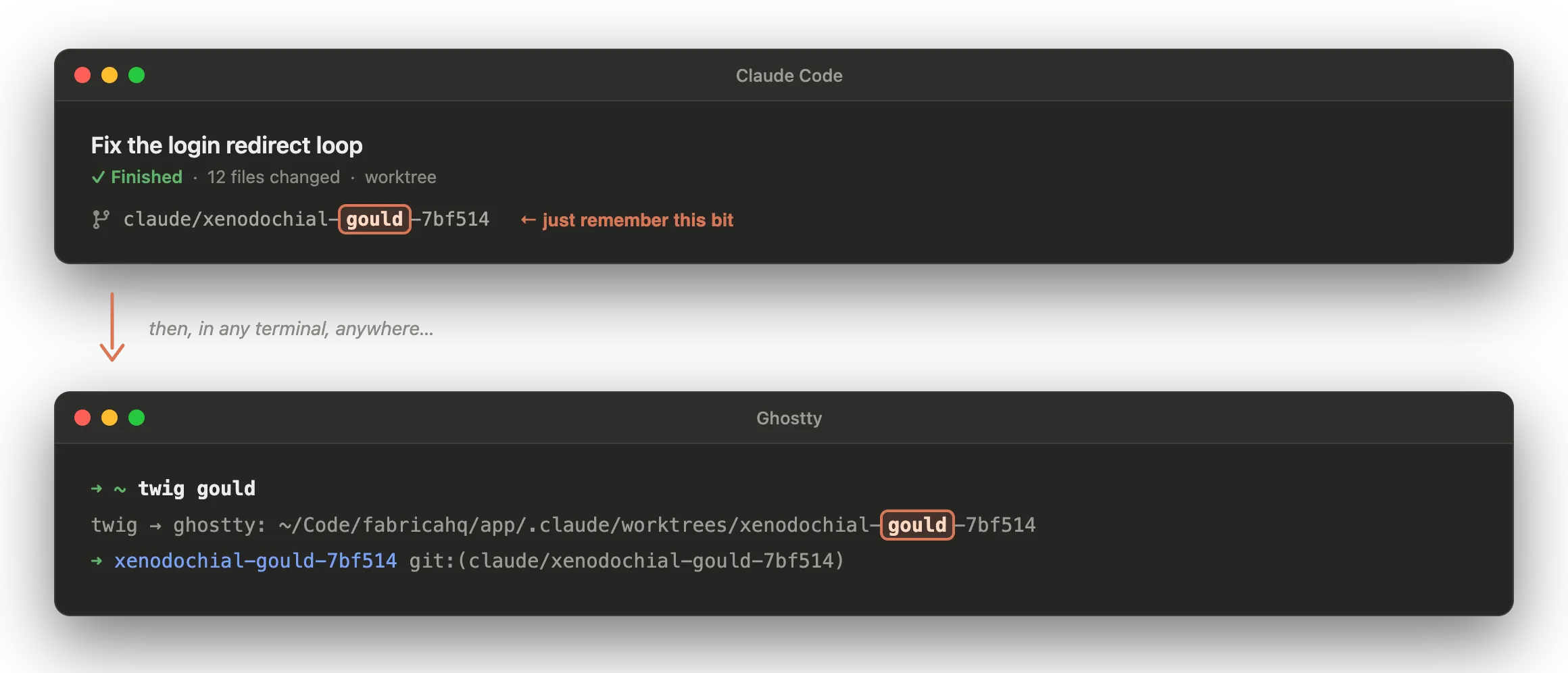
The main idea: while you’re in, say, the Claude Code or Codex UI, you glance
at the worktree or branch name (claude/xenodochial-gould-7bf514) and note
some memorable part of it (gould). One command then does the rest:
How to use it
Section titled “How to use it”- An agent finishes some work. Glance at its branch or worktree name in
the agent’s UI and keep any memorable part: here,
gould. - In any terminal, type
twig gould. twig finds where that worktree lives on disk, opens a terminal there (plus any other openers you configured, like Cursor or a browser tab on your dev server), and runs the repo’s setup script if it hasn’t run yet. - By default twig opens a new terminal window. To jump there inside the
terminal you’re already using, run
tw gouldinstead;twis the small shell function that shell integration installs. Andtwig gould --runalso starts the repo’s declared dev command after setup. - Done with that branch?
twig rm gouldasks for confirmation, calling out any commits you haven’t pushed, then removes the worktree and keeps the branch.
The problem
Section titled “The problem”Git worktrees used to be a niche power tool. Agent tooling changed that. Worktrees now multiply on their own, and every tool has its own ideas about where they belong:
- Claude Code desktop checks out each session inside the repo, at
<repo>/.claude/worktrees/<generated-slug>, with names likexenodochial-gould-7bf514that nobody types twice. - Conductor keeps workspaces far from the repo, at
~/conductor/workspaces/<project>/<name>, and leaves symlinks behind when they’re renamed. - Cloud sessions (Claude Code web, Codex) don’t create a local directory at all: their work is a branch on GitHub that no checkout on your machine has fetched.
Finding where each of those worktrees lives on your local system is a pain. And once you’ve found one, you still need to run the same setup and run commands, over and over, for every fresh checkout.
What twig does about it
Section titled “What twig does about it”One short command works anywhere. twig <fragment> checks the current
repo’s worktree list first (git already knows every worktree, wherever it
lives on disk), then scans known tool locations and your configured roots.
Exact matches beat substrings, branches beat directory names, and real
ambiguity gets a quick picker. Typing gould is enough.
How resolution works.
Setup runs itself, but only when needed. A twig.toml committed at the
repo root says what a worktree needs (bun install, migrations,
whatever). twig runs it on first entry, then skips it until the manifest
or a watched lockfile changes. Every entry path converges on the same
logic, whether you opened a window, cd’d with tw, or ran twig enter
by hand. Setup and run scripts.
Repo-declared code requires consent. Running scripts on “enter” is an
attack vector: checking out a PR branch must never execute attacker code.
twig copies direnv here. Nothing from a twig.toml runs until you’ve
seen it and approved that exact content, and any edit re-trips the gate.
The trust model.
Entering can open your whole working context, not just a terminal. Openers run as a set, so one command can open Ghostty, Cursor, and a browser tab on your dev server, with per-repo overrides. Openers.
Branches that only exist remotely still resolve. With -r, a local miss
falls through to git ls-remote across repos you already have; twig
fetches the branch and builds the worktree for you.
Remote pickup.
Local Codex sessions resolve by their thread link. A local Codex session
runs in a directory rather than making its own worktree, so
twig codex://threads/<id> reads the session’s log and jumps to wherever
it was working. Codex local sessions.
What twig deliberately isn’t
Section titled “What twig deliberately isn’t”- A git replacement. Branch management stays git’s job. Even
twig rmkeeps the branch and tells you thegit branch -dto run. - A daemon or shell hijack. It’s a single static binary plus an optional three-line shell function; nothing runs in the background.
- Configuration-hungry. Conductor and Claude Code layouts work with zero
config, Codex cloud branches are one
-raway, local Codex sessions resolve from their thread link, andtwig initgenerates the rest in about thirty seconds.
Where to start
Section titled “Where to start”Install twig, run twig init, then try
the quickstart.